Context
Food4Kids delivers nutritious food packages to 1,400+ children in Waterloo Region
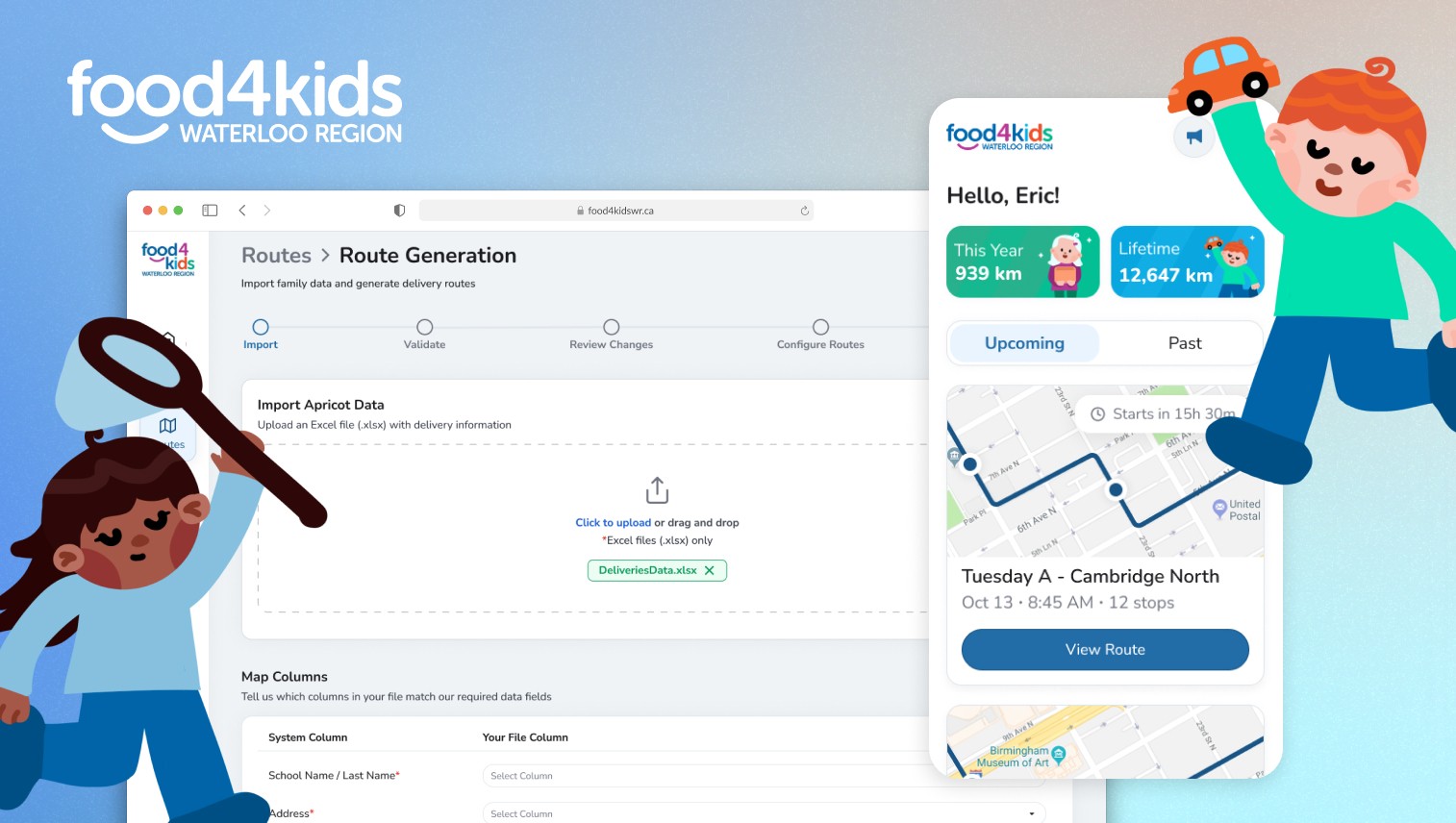
Through UW Blueprint, a student-led team that builds tech for non-profits at no cost, we partnered with Food4Kids to design a platform that streamlines their delivery operations.
Throughout the project, we got the chance to visit their office and speak directly with admins and volunteers, gaining first-hand insight into their workflows and challenges.

Problem
Planning delivery routes is a manual, time-intensive process
Imagine looking through 100s of rows of spreadsheets of addresses in order to create routes for drivers. Then, having to print out each route and give to drivers for user on delivery day.
This process was slow, repetitive, and difficult to update as delivery needs changed.
Solution
A platform for admins to generate, edit, and assign delivery routes
This would help staff spend less time managing spreadsheets and making delivery routes. Drivers could then access routes directly on their phones or print them as needed.
1 // Discovery
Who are we designing for?
For this project, we had two main users, admins and delivery drivers. Through client meetings, we spoke directly with Emily, an admin at Food4Kids to better understand her workflow, pain points and goals, and created personas for both of our users. Meet them below!

Meet Emily
Admin @ Food4Kids WR
Pain Points:
Overwhelmed by tedious tasks like planning routes & assigning drivers
Potential errors in data since everything is done by hand
Goals:
Plan efficient delivery routes & assign them to the correct drivers
Ensure drivers can access clear, detailed route schedules whenever

Meet Eric
Volunteer Delivery Driver @ Food4Kids WR
Pain Points:
Unexpected changes in planned route
Difficulty accessing key delivery details while on the move
Less tech-savvy
Goals:
Be notified of any updates or last minute changes to route
Access & understand route information with ease, regardless of technical comfort level
Key Takeways
Designing around the admin's existing workflow
Admins were already working within spreadsheet-heavy systems, so instead of introducing a new process, we designed a platform to fit into their current spreadsheet workflow.
Accounting for human error
Small inconsistencies in large spreadsheet data could have significant impacts on route generation and delivery accuracy.
Designing for users with varying levels of technical comfort
As many of the drivers were older and less comfortable with technology, we had to prioritize clarity and accessibility in our designs.
2 // Define
Let's flow into Emily's shoes…
User flow time! Keeping our admin's goals in mind, we translated her needs into a route generation flow to understand how she would actually move through the system.

Goal
As an admin, I would like to generate accurate, error-free delivery routes from updated family data so I can reduce manual work and ensure consistent, reliable routes each week.

Key Decisions
Emily's spreadsheet will always be the source of truth
Once she uploads data from her spreadsheet, she will be guided back to it to make updates, ensuring all changes stay centralized & consistent.
Shared route details can be edited all at once
Timing, start location, and other shared settings can be updated to all routes for a given day from here, reducing previously manual work.
Driver assignment happens after route generation
Since only high-level route details are available in this flow, there is not enough context to assign drivers. Assignment happens later for each individual route.
Turning ambiguity into product requirements
Working with the PMs, we began by structuring the route generation process into a 5-step wizard to guide admins from uploading data to generating optimizing routes.
The most critical challenges emerged in the validation flow.
Data Validation — Guiding Question
How do we help Emily identify errors in her data while keeping her spreadsheet as the source of truth?
Emily’s spreadsheet was the primary place where delivery data from forms was collected and managed
Rather than allowing edits directly within our platform, we designed the system to clearly flag issues and guide admins back to their spreadsheet for corrections.
Handling different error states
Initially, we decided to separate data issues into critical errors and warnings:
Critical errors prevented users from continuing when required data was missing or invalid (e.g. missing addresses that prevent route generation)
Warnings flagged potential issues such as duplicate entries that did not require immediate action

This approach was later revisited as we recognized that warnings could easily be overlooked in a fast, spreadsheet-heavy workflow, highlighting the need to better support human error.
3 // Design and Iteration
Designing for clear data validation
Within the route generation flow, I designed a stepper to guide users through each stage of the process.
Focusing on validation, key design decisions included:
Colour to distinguish severity (red for critical errors that must be fixed, yellow for optional warnings)
Displaying next steps through banners to help users quickly understand what required attention
Highlighting specific cells within tables, with inline alerts to clearly indicate exactly where issues occurred
Initial Design (Lo-Fi)


Client feedback sessions with Emily revealed a key issue…
With 100s of rows in the spreadsheet, Emily shared her concerns that warnings felt easy to overlook, and missing them could result in a child not receiving their package.
So we needed to return to the key design principle of accounting for human error.
Iterated Design (Hi-Fi)

Key Design Changes
All errors require action before continuing
I removed the distinction between warnings and critical errors to ensure no issues were accidentally missed during route generation.
Improved clarity of duplicate entries in large datasets
I grouped related duplicate entries together so admins could easily see which records were connected and decide how to handle them as a set.
Responsive design
Since Emily works with 100s of rows, I designed the tables to handle large datasets by adding scrolling states and sticky columns for easier review at any scale.
5-Step Route Generation Flow (Final Design)
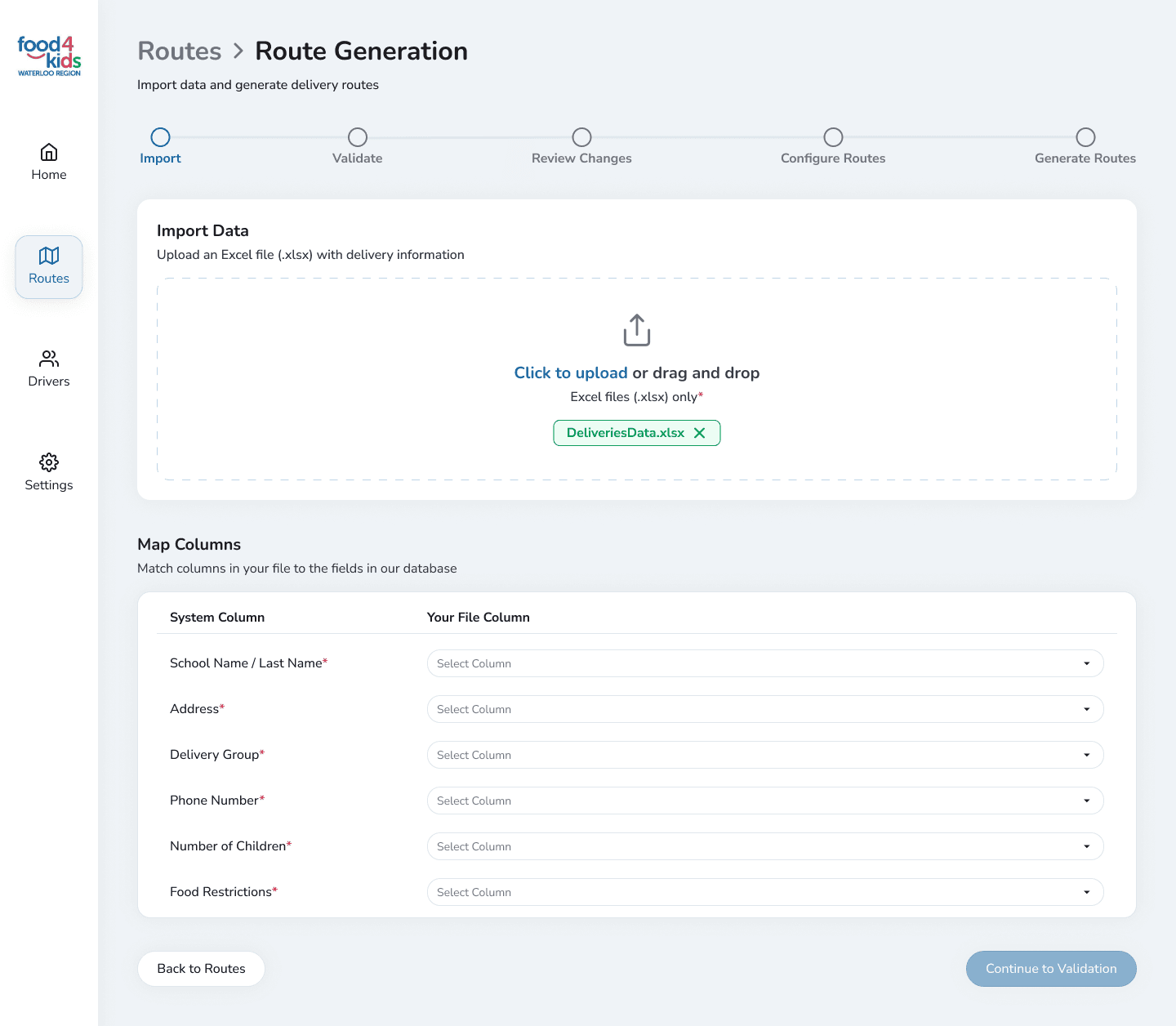
Import
Admin uploads their spreadsheet and maps its columns to ensure data is correctly matched to the system.
Validate
The system checks admin's spreadsheet for errors, and requires all errors to be fixed locally in the spreadsheet before continuing.

Review Changes
Acts as a deliberate friction point to encourage users to review important changes, such as removed or partially updated data, ensuring they weren't done accidentally.

Configure Routes
Admins set their shared route details such as timing and starting locations.

Generate Routes
Admins see their optimized delivery routes as well as detailed statistics.

Reflections
Designing with human error in mind
I learned the importance of design focused on preventing errors rather than relying on users to catch them, introducing deliberate friction to help flag and avoid potential mistakes.
Developer handoffs
By presenting my work to developers, I learned the importance of defending my decisions and also gained valuable feedback on handling edge cases and responsiveness to ensure designs were implementation ready.
Creating a design system
Since I was working with 2 other designers, we regularly synced on design guidelines and documented a comprehensive design system to ensure consistency across our work.
// Extras
Delivery Navigation App for Drivers
Alongside the admin platform, we designed a driver app for viewing delivery details and sharing announcements. Here, I worked on designing the homepage, announcements board, and custom illustrations! Feel free to reach out if you’d like to learn more about the design process behind this :)
